
Wingdings Character Map Full Symbol Chart and Codes 2026
Most people stumble into Wingdings by accident. You change a font in Word, and suddenly your text becomes a row of hands and arrows. If that sounds familiar, this page has everything you need. You get the full wingdings character map, all the codes, and a free tool to copy any symbol without guessing.
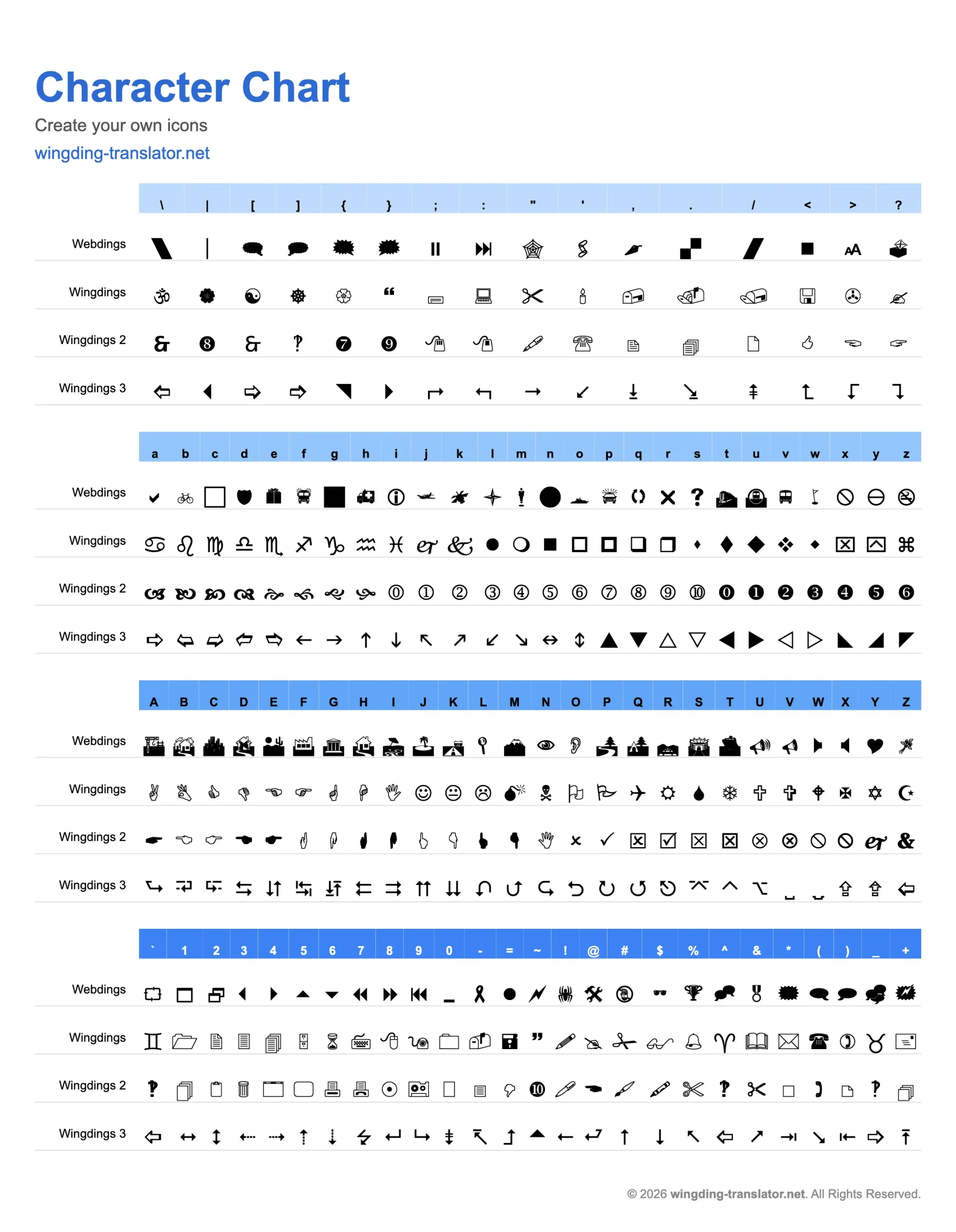
The wingdings character map shows every symbol in the Wingdings font next to the keyboard key that produces it. Wingdings is not a regular font. Instead of showing letters, it displays icons. When you type the letter “A” in Wingdings, you get a graphic symbol, not the letter A. The map tells you exactly which key gives you which icon.
Microsoft released Wingdings in 1990, designed by Charles Bigelow and Kris Holmes. The complete wingdings character set holds 224 symbols, from pointing hands and stars to arrows, checkboxes, and decorative shapes.
Full Wingdings Character Chart
The wingdings character map chart below covers every symbol with its keyboard key and decimal code. The wingdings character map table is grouped by category so it’s faster to scan.
Wingdings Character Chart
Complete reference — click any symbol to copy it or use in translator
Character Chart
Create your own icons
wingding-translator.net
| \ | | | [ | ] | { | } | ; | : | " | ' | . | , | / | < | > | ? | |
|---|---|---|---|---|---|---|---|---|---|---|---|---|---|---|---|---|
| Webdings | \ \ | | | | [ [ | ] ] | { { | } } | ; ; | : : | " " | ' ' | . 🌮 | , 🌶 | / / | < < | > > | ? 🍔 |
| Wingdings | \ ॐ | | ⍓ | [ ☯ | ] ☸ | { ⍐ | } ⍔ | ; 🖴 | : 🖳 | " ✂ | ' 🕯 | . 📬 | , 📪 | / 📭 | < 🖫 | > ✇ | ? ✍ |
| Wingdings 2 | \ \ | | | | [ [ | ] ] | { { | } } | ; ; | : : | " ❤ | ' ✿ | . 🙑 | , 🙐 | / / | < < | > > | ? 🙒 |
| Wingdings 3 | \ \ | | | | [ [ | ] ] | { { | } } | ; ; | : : | " ↩ | ' ↮ | . ⇨ | , ⇦ | / / | < < | > > | ? ⇧ |
| a | b | c | d | e | f | g | h | i | j | k | l | m | n | o | p | q | r | s | t | u | v | w | x | y | z | |
|---|---|---|---|---|---|---|---|---|---|---|---|---|---|---|---|---|---|---|---|---|---|---|---|---|---|---|
| Webdings | a 🏳 | b 🏴 | c 🏁 | d 🚩 | e 🎌 | f 🏹 | g 🏺 | h ● | i ● | j ● | k ● | l ● | m 🐀 | n 🐁 | o 🐂 | p 🐃 | q 🐄 | r 🐅 | s 🐆 | t 🐇 | u 🐈 | v 🐉 | w 🐊 | x 🐋 | y 🐌 | z 🐍 |
| Wingdings | a ♋ | b ♌ | c ♍ | d ♎ | e ♏ | f ♐ | g ♑ | h ♒ | i ♓ | j 🙰 | k 🙱 | l ● | m ❍ | n ■ | o □ | p ◻ | q ❑ | r ❒ | s ⧫ | t ◆ | u ❖ | v ⌧ | w ⍓ | x ⌹ | y ⍌ | z ⍍ |
| Wingdings 2 | a ❤ | b ☞ | c ✌ | d ✍ | e ✎ | f ✏ | g ✐ | h ✑ | i ✒ | j ✓ | k ✔ | l ✕ | m ✖ | n ✗ | o ✘ | p ✿ | q ✚ | r ✛ | s ✜ | t ✝ | u ✞ | v ✟ | w ✠ | x ✡ | y ✢ | z ✣ |
| Wingdings 3 | a ➽ | b ➾ | c ← | d ↑ | e → | f ↓ | g ↔ | h ↕ | i ↖ | j ↗ | k ↘ | l ↙ | m ↚ | n ↛ | o ↜ | p ↝ | q ↞ | r ↟ | s ↠ | t ↡ | u ↢ | v ↣ | w ↤ | x ↥ | y ↦ | z ↧ |
| A | B | C | D | E | F | G | H | I | J | K | L | M | N | O | P | Q | R | S | T | U | V | W | X | Y | Z | |
|---|---|---|---|---|---|---|---|---|---|---|---|---|---|---|---|---|---|---|---|---|---|---|---|---|---|---|
| Webdings | A 🏗 | B 🏘 | C 🏙 | D 🏚 | E 🌐 | F 🏴 | G ✈ | H 🏞 | I ⌛ | J 💀 | K 💣 | L ⚡ | M 🏣 | N 🏤 | O 🏥 | P 🏦 | Q 🏧 | R ♻ | S ☀ | T 📞 | U 🏫 | V 🏬 | W 🏭 | X 🏮 | Y ❤ | Z 🏰 |
| Wingdings | A ✌ | B 🖏 | C 👍 | D 👎 | E ☜ | F ☞ | G ☝ | H ☟ | I 🖐 | J ☺ | K 😐 | L ☹ | M 💣 | N ☠ | O ⚐ | P ⚑ | Q ✈ | R ☼ | S 💧 | T ❄ | U 🕆 | V ✞ | W 🕈 | X ✠ | Y ✡ | Z ☪ |
| Wingdings 2 | A ✍ | B ✏ | C ✑ | D ✒ | E ✓ | F ✦ | G ✕ | H ✖ | I ✗ | J ✘ | K ✙ | L ✚ | M 👈 | N 👉 | O ✝ | P ✏ | Q ✟ | R ✠ | S ✂ | T ☑ | U ✣ | V ✤ | W ✥ | X ☒ | Y ✧ | Z ✨ |
| Wingdings 3 | A → | B ← | C ↑ | D ↓ | E ⇒ | F ⇐ | G ▶ | H ◀ | I ▲ | J ▼ | K ➬ | L ➭ | M ➮ | N ➯ | O ➱ | P ➲ | Q ➳ | R ➴ | S ➵ | T ➶ | U ➷ | V ➸ | W ➔ | X ⬅ | Y ➻ | Z ➼ |
| ` | 1 | 2 | 3 | 4 | 5 | 6 | 7 | 8 | 9 | 0 | - | = | ~ | ! | @ | # | $ | % | ^ | & | * | ( | ) | _ | + | |
|---|---|---|---|---|---|---|---|---|---|---|---|---|---|---|---|---|---|---|---|---|---|---|---|---|---|---|
| Webdings | ` ` | 1 🗕 | 2 📧 | 3 🗗 | 4 🗘 | 5 🗙 | 6 🗚 | 7 🗛 | 8 🗜 | 9 🗝 | 0 🗔 | - - | = = | ~ ~ | ! ! | @ @ | # # | $ $ | % % | ^ ^ | & & | * * | ( ( | ) ) | _ _ | + + |
| Wingdings | ` ` | 1 📂 | 2 📄 | 3 🗏 | 4 🗐 | 5 🗄 | 6 ⌛ | 7 🖮 | 8 🖰 | 9 🖲 | 0 📁 | - - | = = | ~ ~ | ! ! | @ @ | # # | $ $ | % % | ^ ^ | & & | * * | ( ( | ) ) | _ _ | + + |
| Wingdings 2 | ` ` | 1 ➀ | 2 ➁ | 3 ➂ | 4 ➃ | 5 ➄ | 6 ➅ | 7 ➆ | 8 ➇ | 9 ➈ | 0 ➉ | - - | = = | ~ ~ | ! ! | @ @ | # # | $ $ | % % | ^ ^ | & & | * * | ( ( | ) ) | _ _ | + + |
| Wingdings 3 | ` ` | 1 ➚ | 2 ➙ | 3 ➛ | 4 ➜ | 5 ➝ | 6 ➞ | 7 ➟ | 8 ➠ | 9 ➡ | 0 ➔ | - - | = = | ~ ~ | ! ! | @ @ | # # | $ $ | % % | ^ ^ | & & | * * | ( ( | ) ) | _ _ | + + |
How to Read the Chart
Each entry in the chart has three parts:
Wingdings Character Codes
Every symbol has a wingdings character code, a decimal number linked to a standard keyboard key. Knowing these codes lets you insert symbols with keyboard shortcuts inside Microsoft Word.
What Does Wingdings Character Code 110 Look Like?
This one genuinely is searched for a lot but most pages just ignore it. The letter ” n ” on your keyboard is wingdings character code 110. If you type “n” in Wingdings, you get a pencil icon. Pretty useful if you’re working on anything writing, notes or editing related Some other codes that are helpful:
How Do You Type a Wingdings Character?
People often ask how do you type a Wingdings character, and the answer is simpler than most expect. There are two easy ways.
Why Wingdings Symbols Sometimes Go Blank
This part most guides skip entirely. Wingdings symbols live in what Unicode calls the Private Use Area. This means they only display correctly when the Wingdings font is installed on the device reading them. Paste a Wingdings symbol into a website or email on a device without the font, and it shows up as a blank box. For printed documents and PDFs, wingdings character codes work perfectly. For sharing online, standard Unicode symbols are safer.
Wingdings vs Wingdings 2, 3 and Webdings
The original wingdings character set is the most versatile, but Microsoft made three versions. Wingdings 2 focuses on checkboxes and pointers. Wingdings 3 leans heavily on arrows and triangles. Webdings was built for early web use with more modern-looking icons. For most tasks, the standard wingdings character map gives you everything you need.
Frequently Asked Questions
What is the wingdings character map used for?
Scrolling through a font menu to find one symbol wastes more time than it should. The wingdings character map above gives you every symbol in one place with its key and code right next to it. Just find what you need, copy it, and paste it into your document. Use the free tool now and grab any wingdings character in seconds.